Collection Index
Backpack space grows from Index claims, not a shop purchase. New material types count; duplicates do not.
By Bloxron Editorial Team · Last updated
Index overview
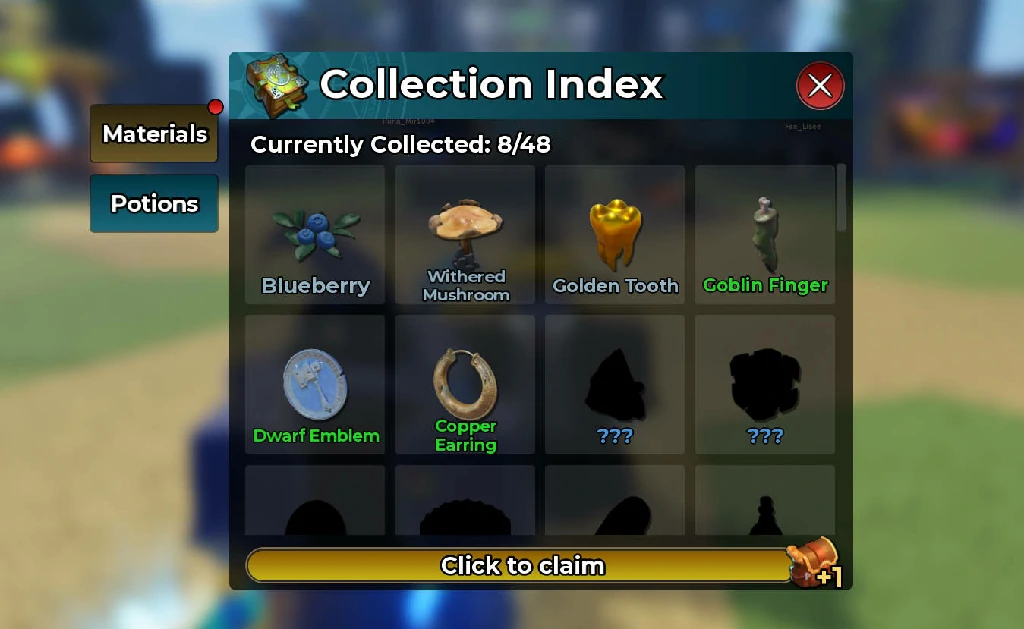
The Collection Index awards backpack slots for distinct discoveries. Claim from the Index chest when the X/Y target fills — duplicates of logged types do not advance the count.
Increase backpack storage
Check the target, hunt new types, skip duplicates, then claim the chest for +1 slot. Exact X/Y numbers are only reliable in the live Index UI.
- Check the target. Open Index from the hub (often the book icon on the left menu). Note Currently Collected and the milestone line (format: Complete X/Y to get +1) near the reward chest, exact X/Y numbers are only reliable in that UI.
- Hunt new types. Enter the dungeon, walk onto drops, and interact to pick them up. Log material types you have not seen yet, missing entries may show as ???.
- Skip duplicates. Only new types count, copies of known materials do not move the milestone.
- Claim and confirm. Return to the hub, open Index, and use Click to claim when the chest shows +1. A successful claim shows “Backpack storage increased by 1” and capacity ticks up one slot (for example 0/4 → 0/5).
Chest stays locked until the distinct-type count hits the listed target. Some milestones may need discoveries beyond raw drops (for example a new brew), trust the Index line. Push later dungeon stages when early floors stop dropping new types.