Animal Hospital Anomaly Checker
Desk-side reject helper, pick the check layer (window, photo, CCTV, paperwork), tap symptoms you see, and read whether to hit Shutters before admitting a fake patient.
By Bloxron Editorial Team · Last updated
About the Anomaly Checker
Desk intake helper: pick the check layer (appearance, photo, CCTV, paperwork, audio), tap the tell you see, and read whether to hit Shutters before the patient walks in. Full tell tables sit on Anomalies. Timed HUD crises after intake sit on the Emergency Solver.
For timed emergencies after patients are inside, switch to the Emergency Solver; for full tell tables see Anomalies.
Interactive tool
Which check layer failed?
Pick where you spotted the tell, tap quick symptoms or search, then read the fix before you admit the patient. For mid-shift crises after intake, use the Emergency Solver.
Check layer
Visible at reception before photo or camera checks.
Quick symptoms
Matches (10)
Three Eyes
ShuttersThree glowing red eyes instead of two, one of the most obvious desk tells.
Hollow Face
ShuttersEmpty holes where eyes should be, often with a wide frown or blank scowl.
Note: If admitted, recovery often triggers a Death Ritual, reject at the window.
Wide Eyes and Creepy Smile
ShuttersBulging or oversized eyes with a fixed, creepy grin.
Human Teeth
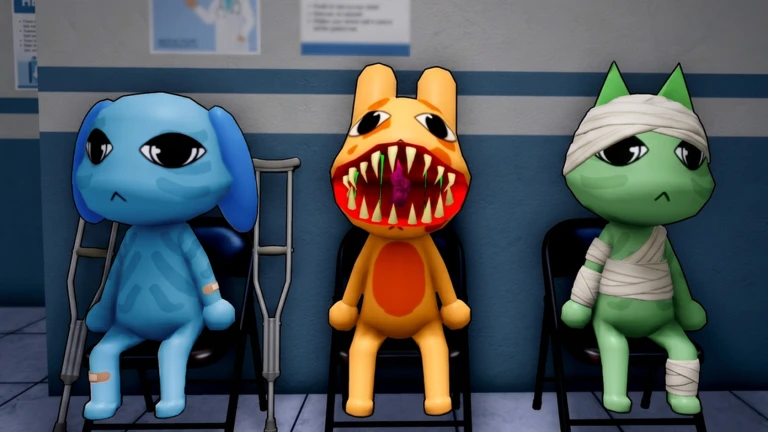
ShuttersHuman-like chompers or an oversized mouth on an animal patient.
Mismatched Eyes and Sharp Teeth
ShuttersEyes at uneven heights plus a stretched grin, or a board-like face with drawn eyes and warped limbs.
Twitching
ShuttersJerky arm, hand, or neck spasms while the model should be still, watch at least four to five seconds.
Note: May only show on CCTV for some visitors, recheck the monitor if the lobby view looks clean.
Staring at the Player
ShuttersHead tracks your movement at the window, step side to side for a few seconds before you admit them.
Note: Walk behind the visitor to confirm: a real patient stops tracking; this tell keeps its head locked on you. Not the same as Staring at the Camera on CCTV.
Human-like Features
ShuttersHuman eyes or a human mouth on an otherwise normal animal visitor.
Tiny Anomaly
ShuttersVisitor is much shorter than every other patient, often a pink rabbit with three eyes, but other tiny fake forms appear. Easy to miss if you only glance at normal eye height.
Note: Random on any shift. Right now every miniature visitor is treated as an anomaly, no safe child patients. Still run photo and CCTV. If admitted, it turns hostile like a Mimic (Taser / Gun). Journal Achievement pays a tiny Animal Coin reward after a check-in; safe desk play still prefers Shutters.
Flower Visitor (hidden fangs)
ShuttersDeer-like visitor carrying flowers at check-in. Most are real, scan the mouth before you register. Fangs or predator teeth behind a friendly face mean Shutters.
Note: Still run photo and CCTV even when the bouquet looks harmless.
How to use
- Pick your check layer. Choose where you spotted the tell, window, polaroid, CCTV feed, or paperwork and audio when the UI offers those steps.
- Tap symptoms or search. Use quick symptom chips for common desk tells, or type a short search like twitching, void body, or wrong species.
- Read the fix. Most desk fakes end with Shutters. The result panel shows how to spot the anomaly and any sanity or timing notes before you admit anyone.
- Run every layer. One clean appearance check does not clear photo or CCTV. Repeat for each layer the game surfaces before you assign a room.
Layers covered list
- At the window, 10 desk anomalies
- On the polaroid, 6 desk anomalies
- On CCTV, 10 desk anomalies
- Paperwork & audio, 6 desk anomalies
FAQ
What is the Animal Hospital anomaly checker?
A free desk-side picker for fake patients, choose the check layer you are on (window, photo, CCTV, or paperwork), tap symptoms you see, and read whether to hit Shutters before admitting anyone.
When should I use it vs the Emergency Solver?
Use the anomaly checker at reception before Room assignment. Use the Emergency Solver mid-shift when HUD alerts stack, fires, Ghost, Skin Walker, Death Ritual, and similar crises.
Does one clean layer mean the patient is real?
No. Run every layer the UI offers, appearance, snapshot, CCTV, then paperwork and audio when those steps appear. One clean check does not clear another.
Do Rain Shift fish patients skip desk checks?
No. Fish / Anglerfish skins still need appearance, photo, and CCTV. Anomalies can disguise as fish, watch for Rain Axolotl ear mismatches on the feed. Shutters on any failed layer. Floor puddles restore +1 Sanity (Psychologist +2); they are not slime hazards.